Introducing Client Flow: From Intake to Completed Distribution
Foodbank.city Introduces a Complete Client Flow—from Intake to Checkout
Food banks serve many clients each day, often with limited staff, changing volunteer teams, and multiple service areas operating at the same time. Without a clear system, it can be difficult to know who has completed intake, who is waiting, who is currently shopping, and who is ready to check out.
foodbank.city now includes a complete Client Flow Management feature that helps food banks guide and track each client through the entire visit—from intake to completion.
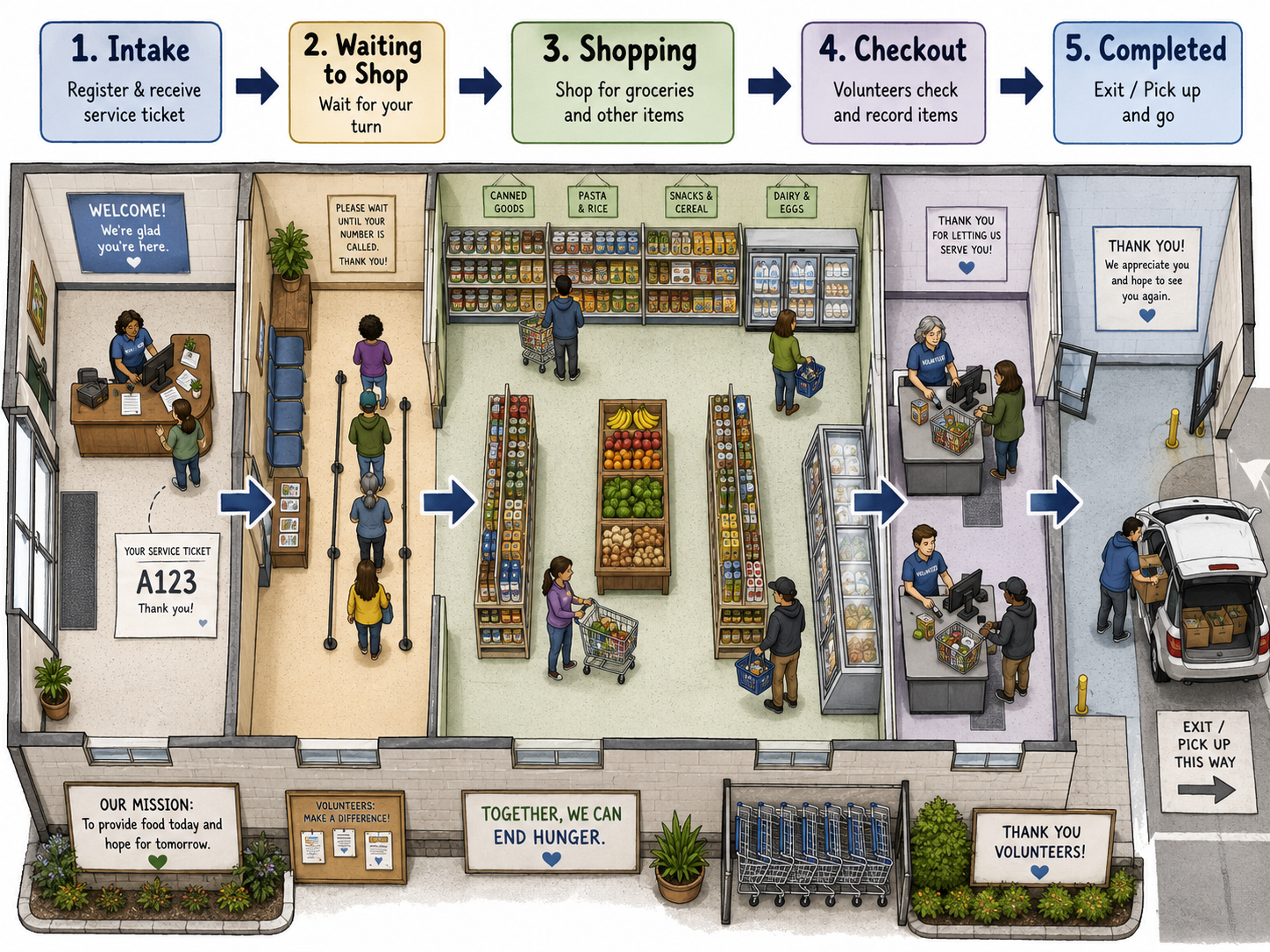
The new workflow follows five clear stages:
Intake → Waiting to Shop → Shopping → Checkout → Completed
This gives staff and volunteers a real-time view of where every client is in the process while helping the food bank identify delays, manage capacity, and provide a more organized and respectful client experience.
1. Intake
The client journey begins at intake.
Staff members locate or create the client record, confirm the household information, complete the required intake steps, and begin a new service visit. foodbank.city clients can also self-checkin at the Client Check-in station.
Once intake is complete, foodbank.city generates a unique service ticket for the visit. The ticket can include:
A large service or queue number
A barcode or QR code
Household size
Shopping or service eligibility
Appointment information
Special assistance instructions
Optional pager or notification information
The ticket serves as the physical connection between the client, the volunteer team, and the digital visit record.
Because every ticket has a unique visit identifier, staff can scan it at different points in the food bank to quickly update the client’s status.
2. Waiting to Shop
After intake, the client moves into the Waiting to Shop queue.
The foodbank.city operations screen shows all clients who are waiting, how long they have been waiting, and the order in which they arrived.
Staff can also see important operational information, such as:
The client’s service ticket number
Appointment time
Time intake was completed
Household size
Assistance requirements
Assigned pager or notification method
Total time spent waiting
When a shopping area or volunteer becomes available, the client can be called by service number, contacted by text message, or notified through a pager.
This helps protect client privacy because the public waiting-area display can show an anonymous number instead of the client’s name.
For example:
Ticket FB-1042 — Please proceed to the shopping area
3. Shopping
When the client begins shopping, a staff member or volunteer scans the service ticket or selects Start Shopping in foodbank.city.
The client immediately moves from the waiting queue into the Shopping stage.
The system can record:
The time shopping began
The assigned volunteer or personal shopper
The shopping station or service area
The client’s shopping allowance
Special dietary or household needs
Additional services requested during the visit
This gives staff a live view of how many clients are currently shopping and how much capacity remains in the shopping area.
It also helps prevent overcrowding by allowing the food bank to control how many households enter the shopping area at one time.
4. Checkout
When shopping is complete, the service ticket is scanned at checkout.
The client moves into the Checkout stage, where staff or volunteers can review the visit, verify the items provided, complete any required inventory transactions, and confirm that the household has received the appropriate services.
Depending on the food bank’s procedures, checkout may include:
Reviewing the shopping cart
Recording selected items
Confirming household limits
Processing weighed products
Updating inventory
Recording additional programs or services
Preparing groceries for loading or pickup
Because the checkout process is connected to the original intake record, staff do not need to re-enter the client’s information.
5. Completed
After checkout, the visit is marked Completed.
The completed visit becomes part of the client’s service history and can be included in operational reports, inventory records, program statistics, and funding reports.
The system records important timestamps throughout the journey, including:
Intake completion
Time added to the waiting queue
Shopping start and completion
Checkout start
Visit completion
These timestamps allow food banks to understand how long each stage takes and where delays may be occurring.
A Real-Time View of the Entire Food Bank
The Client Flow Management feature gives authorized staff a live operations board showing where clients are throughout the facility.
The board can display separate columns for:
Intake
Waiting to Shop
Shopping
Checkout
Completed
Each client visit appears as a service ticket that moves from one stage to the next.
Staff can update a ticket by scanning its barcode, clicking a status button, or selecting the next stage from a workstation, tablet, or supported mobile device.
Supervisors can quickly see:
How many clients are currently being served
How many clients are waiting
How long each client has been waiting
Which volunteers are assisting clients
Whether the shopping area is reaching capacity
Where a bottleneck is developing
Which visits may require immediate attention
Supporting Service Tickets, Displays, Text Messages, and Pagers
The foodbank.city client flow is designed to support multiple communication methods.
A food bank may choose to notify clients through:
A printed service ticket
A waiting-room display
A verbal announcement
A text message
A restaurant-style pager
The notification method is connected to the visit, not permanently attached to the client.
For example, a client may receive service ticket FB-1042 and pager P12. When the shopping area is ready, staff can select the client’s ticket and notify the pager.
Clients without mobile phones can use a pager or watch the public display, while clients waiting in their vehicles may prefer a text message.
Protecting Client Privacy
Client privacy is built into the workflow.
The internal staff screen may show the client’s name and service details, but public displays should only show an anonymous service number.
Sensitive information such as eligibility, income, benefits, household details, medical information, or personal assistance notes is never displayed publicly.
This allows the food bank to provide clear queue information without publicly identifying the people receiving assistance.
Better Information for Better Service
The new client flow also creates valuable operational data.
Food banks can measure:
Average intake time
Average waiting time
Average shopping time
Average checkout time
Total visit duration
Peak service periods
Number of clients served per hour
Number of active shopping stations
Volunteer capacity
Service delays and bottlenecks
This information can help managers adjust staffing, improve volunteer scheduling, redesign service areas, and better prepare for high-demand days.
A More Organized and Dignified Client Experience
The purpose of the Client Flow Management feature is not simply to move people through a queue faster.
It is designed to create a calmer, clearer, and more dignified experience.
Clients know what stage they are in and what happens next. Volunteers know who needs assistance. Staff can identify delays before they become serious problems. Supervisors have a real-time understanding of the entire operation.
By connecting intake, printed service tickets, shopping, checkout, notifications, and reporting in one system, foodbank.city gives food banks a practical way to manage the complete client journey.
The result is a more organized operation, better information for staff, and a more respectful experience for every household served.